
Logistics operations thrive on the seamless convergence of precision and speed. By eradicating manual bottlenecks within the billing chain, businesses can significantly truncate their revenue cycles. The ShipX automated invoicing framework is meticulously constructed to sustain this rigor, safeguarding data integrity from the moment a shipment is audited to the final transmission of the invoice.
The Nexus of the “Audited” Status
The workflow originates within your Operations team. Once all processing for a shipment is finalized, dispatchers must validate the information under the Billing tab and designate the file as “Audited”.
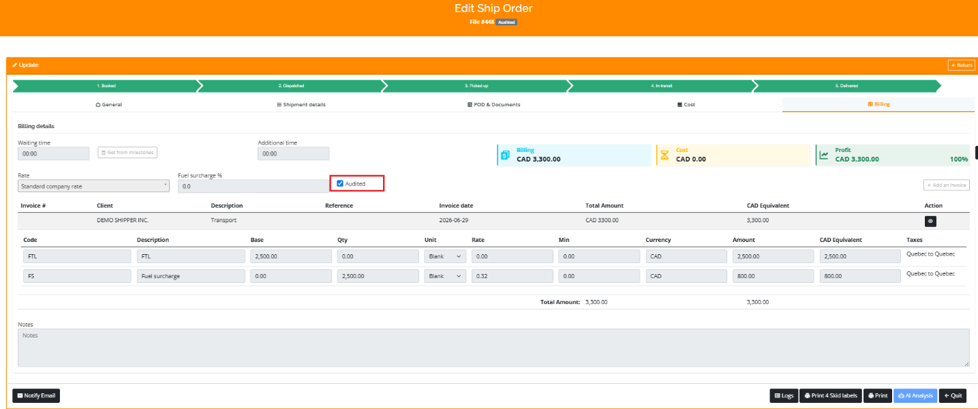
Verify billing details and select ‘Audited’ to transition the file to the invoicing stage.
This pivotal action serves as the catalyst for the entire automated sequence. Marking a file as “Audited” fulfills two critical mandates:
- Centralization: It systematically migrates the file to the Billing Menu, consolidating all verified items into a singular interface for streamlined management.
- Quality Assurance: It substantiates that the file is comprehensively prepared, ensuring only validated data enters the invoicing cycle.
Navigating the Billing Interface
Once files are deemed ready, the Billing Menu facilitates rapid batch invoicing. To generate your invoices, adhere to these procedures:
Accessing the Interface: Navigate to the main navigation bar, locate the Trucking menu, and select Billing.
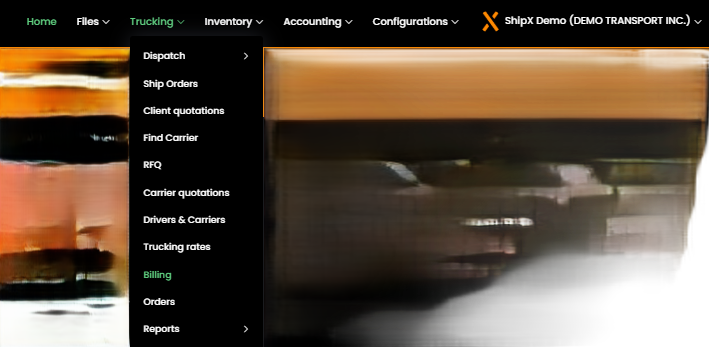
Access the invoicing interface via the ‘Trucking’ menu in the main navigation bar.
- File Selection: Within the Billing interface, utilize the checkboxes in the primary column to designate the specific files intended for the invoice.
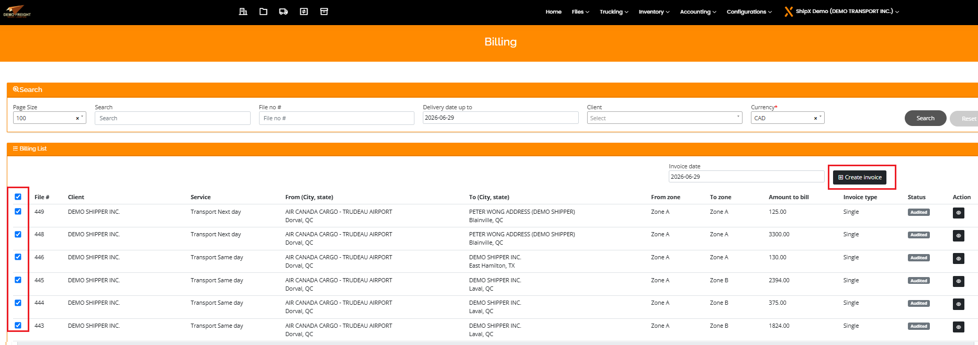
Select specific files using the checkboxes, then click ‘Create invoice’ to process your batch.
- Invoicing Execution: Upon selecting the desired files, execute the “Create invoice” command located in the upper right quadrant of the Billing List.
- Final Authentication: A confirmation prompt will manifest. Scrutinize the query and select “Ok” to finalize the generation, or “Close” to abort the operation.
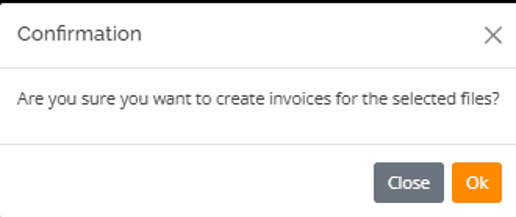
Confirm your selection to finalize and automatically generate the invoices.
Seamless Automated Distribution
The concluding advantage of this workflow is the total mitigation of manual distribution. Once the invoicing process is finalized, the system autonomously transmits the invoice to the client’s designated email address.
This automation harmonizes the workflow by ensuring immediate delivery, thereby allowing your team to eschew manual distribution and dedicate their expertise to optimizing broader logistics operations.
Empowering Your Operational Peace of Mind
Transitioning to this automated architecture is more than just a procedural upgrade; it is a liberating shift for your team. By eradicating the repetitive burden of manual tasks, you reclaim valuable time and eliminate the anxiety of potential human error in your billing cycle.
Our system does not merely generate invoices; it provides unwavering consistency and reliability, ensuring that your financial relationships remain seamless and professional. Embrace this decisive evolution in your workflow, and experience the profound impact of a system that finally works in perfect harmony with your business objectives.