
Introduction
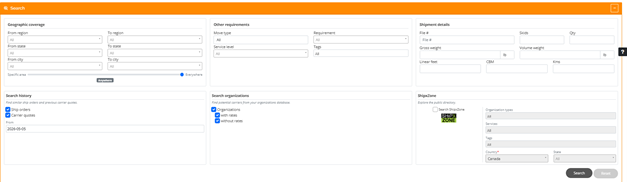
The Find Carrier feature simplifies and optimizes carrier selection within ShipX. By consolidating geographic criteria, shipment specifications, internal historical data, and public directory searches into a single interface, dispatchers can efficiently source the best transport options. The system searches sequentially across established contracted rates, historical usage records, and the broader ShipXzone directory.
Search Criteria Breakdown
1. Geographic Coverage
- Origin & Destination: Filter origin and destination routing by region, state/province, or city (From/To fields).
- Specific Area Slider: Adjust proximity matching from Specific area to Everywhere.
2. Other Requirements
- Move Type & Service Level: Define operational parameters such as transport mode or service speed.
- Requirements & Tags: Filter carriers by specific operational equipment or custom labels.
3. Shipment Details
- File #: Associate the search directly with an existing file number.
- Cargo Specifications: Input dimensions and weight metrics, including Skids, Qty, Gross weight, Volume weight, Linear feet, CBM, and distance in Kms.
4. Search Scope & Sources
- Search history: Retrieve historical context by searching previous Ship orders or Carrier quotes starting from a selected date.
- Search organizations: Query your internal database for existing carrier organizations, with options to filter by those with rates (contracted) or without rates.
- ShipXzone: Toggle the Search ShipXzone option to query the global public directory by Organization types, Services, Tags, Country, and State.
Find Carrier Results Page
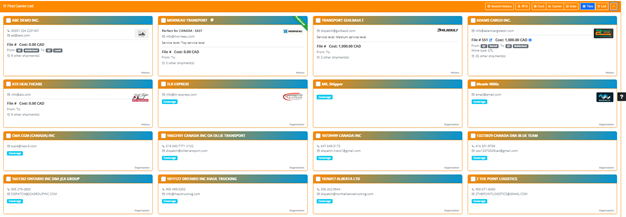
The Find Carrier List displays matching transport partners based on your search criteria. Results are presented in interactive cards with key operational metrics and quick-action tools.
Top Action Bar
- Search history: Returns to the main search criteria screen to refine your query.
- RFQ: Initiates a Request for Quotation directly to selected carriers.
- Sorting Options: Quick-sort results by Cost, Carrier (alphabetical), or Date.
- View Modes: Switch between Tiles (grid view) and List view formats.
Carrier Card Information
- Carrier Status & Badges: Identifies preferred carriers with a Preferred banner and highlights operational requirements (e.g., Haz. Mat).
- Contact & Service Levels: Displays primary contact emails, phone numbers, and designated service levels.
- Cost & Route History: Shows pricing estimates (Cost in CAD), origin/destination lane history (From/To badges), and associated file numbers.
- Historical Activity: Indicates the total volume of past transactions via the other shipment(s) counter.
- Source Origin: Bottom-right badges distinguish whether the result originates from History, your internal Organization database, or Coverage (ShipXzone network).
Explore ShipXzone Directory View
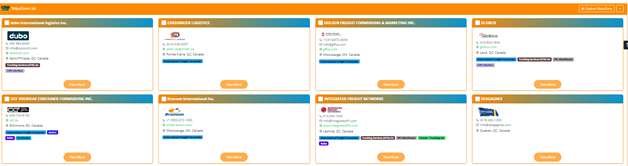
The ShipXzone List view displays external transport providers and logistics partners available within the global ShipXzone network. This public directory allows users to source new partners outside their internal database.
Directory Card Layout & Features
- Company Identification: Displays the official organization name, company logo, phone number, email address, and direct website URL.
- Geographic Location: Shows the primary operating headquarters (City, State/Province, Country).
- Service Badges & Certifications: Highlight operational capabilities and industry accreditations through color-coded tags, including:
- International Freight Forwarder
- Trucking Services (OTR) cie / Carrier – Trucking cie
- 3PL Warehouse
- NVOCC
- Reefer / Perishable
- Ciffa Member
- Detailed Profile Access: Click the View More button on any card to open the complete partner profile, including expanded lane coverage, operational details, and contact options.
- Network Explorer: Use the Explore ShipXzone button in the top header to adjust public directory search parameters or refresh network listings.
ShipXzone Partner Details View
The ShipXzone Details modal offers a comprehensive operational overview for any partner selected from the directory.
- Overview & Profile: Displays company operational highlights, service capabilities, and general background information.
- Badges & Classifications: Highlights core designations such as HQ (Headquarters), International Freight Forwarder, and NVOCC.
- Services: Lists supported transport modes and operational scopes, including International Transport, Import, Export, Air, Ocean, and Project cargo.
- Tags: Features specialized handling capabilities such as Refer and Perishable.
- Contact & Location Information: Provides anonymized, quick-reference location and contact details for dispatch teams.
Conclusion
By centralizing contracted rates, internal history, and the expanded ShipXzone directory into a single, intelligent workflow, Find Carrier transforms how dispatchers evaluate and select transport partners. Instead of searching across disconnected systems or external directories, teams can immediately identify the most cost-effective and qualified carrier for any load. This streamlined approach minimizes operational friction, ensures rate consistency, and opens up new network opportunities—delivering a faster, smarter, and more reliable dispatching process from start to finish.